Train Track | For Addexio
Published on January 1, 2023
By _PotatoDude_
👁️🗨️ 69
25
★
★
★
★
★
Rate it
Screenshots
Description
!! READ THIS ADDEXIO, VERY IMPORTANT !!
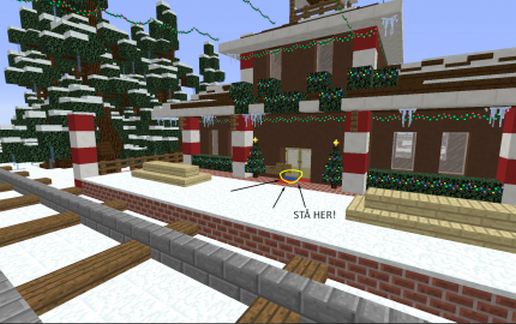
Check one of the images for where to stand to paste, it is VERY important to stand correctly!
REMEMBER TO USE: " //paste -a ", you NEED that -a, or else everything will go straight to hell. :) The world generation is a tiny bit different, so I couldnt include terrain for you. If the image isn't enough: Go to your trainstation, and go towards the door leading inside of it, and look at the train track, and go to the right corner of the double doors, it should be perfectly placed then, unless you have changed the doors location since episode 2. If you want to be safe, you can paste it far up in the air to get a quick look at it, to see if everything matches for safety if you are not too sure about it.
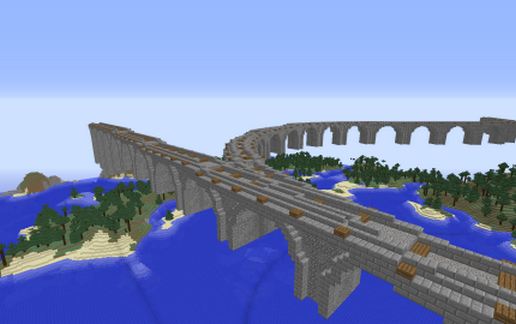
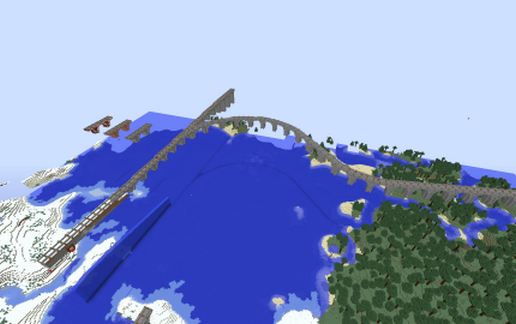
This is a massive Train Track made for Addexio that splits two ways. It is not intended to go in the middle of the city, and is more towards the outside, to be more in the background than in the middle of the picture.
If you wish for me to edit the blocks or make it actually go in the middle of the city, I can pull it off with some world edit magic at your request, Addexio.
Hopefully you will find a use for this! Took me 2 days and 12+ hours of work.
From your friendly potato... Potato...?
Check one of the images for where to stand to paste, it is VERY important to stand correctly!
REMEMBER TO USE: " //paste -a ", you NEED that -a, or else everything will go straight to hell. :) The world generation is a tiny bit different, so I couldnt include terrain for you. If the image isn't enough: Go to your trainstation, and go towards the door leading inside of it, and look at the train track, and go to the right corner of the double doors, it should be perfectly placed then, unless you have changed the doors location since episode 2. If you want to be safe, you can paste it far up in the air to get a quick look at it, to see if everything matches for safety if you are not too sure about it.
This is a massive Train Track made for Addexio that splits two ways. It is not intended to go in the middle of the city, and is more towards the outside, to be more in the background than in the middle of the picture.
If you wish for me to edit the blocks or make it actually go in the middle of the city, I can pull it off with some world edit magic at your request, Addexio.
Hopefully you will find a use for this! Took me 2 days and 12+ hours of work.
From your friendly potato... Potato...?
Download: Train Track | For Addexio schematic for Minecraft
| Format | Size | Use with | |
|---|---|---|---|
.litematic train-track-|-for-addexio.litematic |
56.18 KB | Litematica (Java) — more Litematica schematics |
|
.schem train-track-|-for-addexio.schem |
17.07 KB | WorldEdit / FAWE |
|
.schematic train-track-|-for-addexio.schematic |
28.58 KB | Legacy / online installer |
|
Install this build directly on your Minecraft map
Auto-converted from the original format; container contents (chests, signs) may be missing.
📘 How to use with Litematica (click to expand)
- Put the downloaded
.litematicfile into the.minecraft/schematics/folder. - In game, press M to open the Litematica menu and choose Load Schematics.
- Select the file in the list and click Load Schematic.
- Position the placement where you want it and build — or paste it instantly in creative with Easy Place mode.
Requires the Litematica mod (Java Edition).
More builds: Litematica schematics.